Data Preparation is currently in Public Preview and might change or is not feature complete. While we try to keep changes as low as possible, breaking changes and feature removals happen. To enable the feature, open the right drawer (by clicking on your username initials) in the Administration application and select Manage preview features. Then activate the toggle next to Data Preparation.
Overview
Data Preparation
Data Preparation provides a modern, AI-first environment for creating and managing data transformation logic to help you convert raw device data into the Cumulocity data model. As IoT devices often communicate in various formats (from standard JSON to IoT-specific binary protocols), Data Preparation acts as a bridge that ensures your data is standardized, corrected, and ready for use across the platform and downstream.
Data Preparation uses smart functions — modular pieces of logic that independently process incoming messages to generate one or more Cumulocity-compliant outputs. For details, see Smart functions.
Why use Data Preparation
Data Preparation empowers you to:
Easily convert raw payloads into standard Cumulocity measurements, events, alarms, and inventory objects.
Use a conversational AI chat interface to describe your business context and automatically generate the necessary transformation code in a smart function.
Perform real-time calculations (for example, converting Fahrenheit to Celsius) or correct values based on predefined normal ranges.
Automatically map and create devices based on external IDs found in the payload, source client ID, or topic path.
Scale with support for high-volume data ingestion, as Data Preparation is built on high-performant, scalable infrastructure.
Key capabilities
AI-first experience — The primary user interface is an AI assistant that writes and optimizes Javascript-based transformation logic based on your prompts (leveraging the AI Agent Manager).
Built-in code editor — A simplified IDE is available to manually view, edit, or paste pre-written logic.
Testing and validation — Run tests using sample data (either manually uploaded or captured live from an MQTT topic) with a visual comparison.
Integrated deployment — Once a rule is active, it runs continuously as data is posted to the subscribed MQTT Service topics.
Info
Data Preparation handles data normalization only. For complex event processing, aggregations, or real-time analytics IoT use cases, use Streaming Analytics after Data Preparation has normalized your data.
Architecture
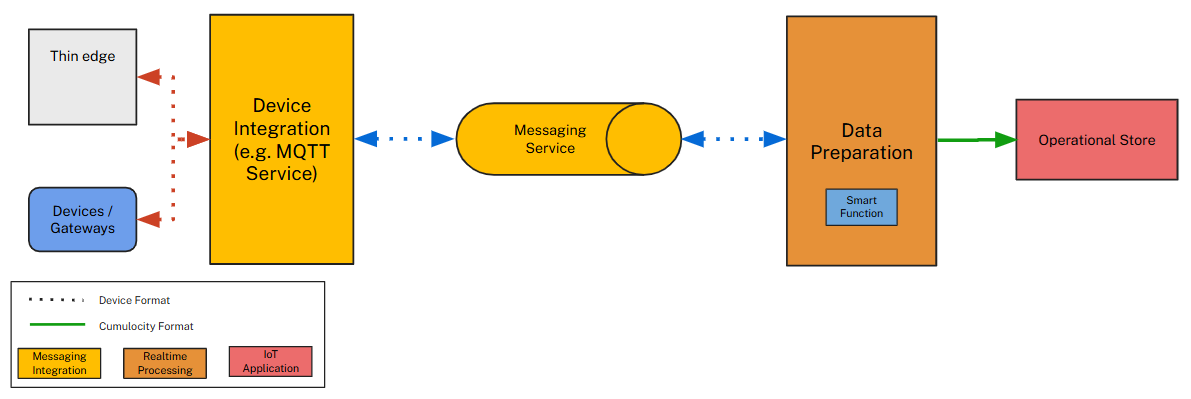
The diagram below illustrates the Data Preparation service flows within a tenant.
Data Preparation receives raw device messages, applies user-defined transformation logic, and forwards the resulting Cumulocity objects to the platform for persistence and use by applications (for example, Streaming Analytics).
How Data Preparation works
Data Preparation listens for incoming device messages on MQTT Service topics. When a message arrives, it evaluates all active rules subscribed to patterns that match the message topic. Each matching rule runs its smart functions against the payload and the resulting Cumulocity objects — measurements, events, alarms, or managed objects — are forwarded to the platform and persisted.
Multiple active rules can subscribe to patterns that match the same topic and execute independently. A single message can trigger multiple rules, and each rule can produce multiple output objects.
Key concepts
Smart functions
Smart functions provide a lightweight way to extend the functionality of Cumulocity across multiple components. They let you write small Javascript functions that run in a secure, isolated environment — more powerful than configuration but much simpler than building a full microservice. For details, see Smart function concept and Smart functions.
Rules
A rule is the deployable unit in Data Preparation. It pairs a smart function with an MQTT topic subscription and an activation state. When active, a rule processes every message posted to its subscribed topic. Rules can be created, tested with sample data, activated, deactivated, and deleted through the Data Preparation application. For details, see Rule creation and management and Rule editor.
Test data
Test data is sample device payload that you use to validate your smart function before activating a rule. Data Preparation runs an input payload in the device’s native format through the smart function to compare the resulting Cumulocity output side by side. You can define multiple test cases per rule, capture live messages directly from an MQTT topic, or add payloads manually. For details, see Test data.
To access interactive API documentation within your tenant, subscribe to and install the Api-doc extension from Administration > Ecosystem > Extensions, then open the API documentation application and select the Data Preparation tab.
You can also retrieve the raw OpenAPI JSON specification directly:
To use Data Preparation, ensure you have the following prerequisites set up.
Permissions
Verify that your user’s role includes the required permissions:
Permission type
Level
Access granted
Data Preparation rules
ADMIN
View, create, edit, and delete draft rules.
Data Preparation rules
READ
View rules, view their logs, and download the diagnostics archive.
Data Preparation deployments
ADMIN
Deploy and undeploy rules to production. Does not include permission to view or edit the rules.
Data Preparation deployments
READ
View deployment status and errors.
Assign these permissions to your global role in the Administration application, and make sure this role has access to the Data Preparation application. See Managing permissions and roles for details.
AI configuration
Set up a global provider with the AI Agent Manager to enable the AI assistant in Data Preparation (for details on enabling preview features and learning about the AI Agent Manager, see the AI Agent Manager documentation).
The AI assistant helps you describe your business context and automatically generates the necessary transformation code in a smart function.
We recommend using Anthropic claude-sonnet-4-6 as the provider for optimal results.
Enabling Data Preparation public preview
To enable Data Preparation, open the right drawer (by clicking on your username initials) in the Administration application and select Manage preview features. Then activate the toggle next to Data Preparation.